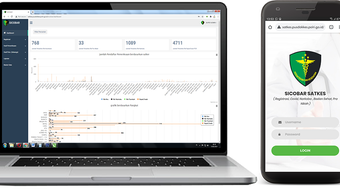

Download SICOBAR APK – Simplifying Health Services for POLRI Personnel
Overview
SICOBAR is a specialized Android application developed by SATKES MABES PUSDOKKES POLRI, designed to streamline access to healthcare services for personnel within the Indonesian National Police (POLRI). The application serves as a digital gateway to medical resources provided by SATKES MABES POLRI, aiming to reduce administrative delays and improve service efficiency. By centralizing key health-related functions, SICOBAR enables POLRI staff to manage their medical needs with greater convenience and speed.
The primary purpose of SICOBAR is to simplify the process of booking medical appointments, viewing personal medical records, and accessing information about available health services. This is particularly beneficial for active-duty personnel who may face time constraints or logistical challenges in visiting medical facilities in person. The application is tailored specifically for a professional, institutional user base, focusing on the health and well-being of POLRI members.
Real-world usage scenarios include scheduling check-ups, retrieving past treatment histories, and staying informed about clinic hours or service availability. As a free-to-use tool, SICOBAR supports the digital transformation of healthcare access within a government security organization. The application was released on April 17, 2024, and is currently available for Android 13.0 and above.
Key Features & Capabilities
- Appointment Booking System: Users can schedule medical appointments directly through the app, reducing wait times and enabling better planning for health visits.
- Medical Records Access: The application provides secure access to personal medical records, allowing users to view past diagnoses, treatments, and prescriptions.
- Service Information Portal: Real-time updates on available medical services, including specialty clinics, vaccination schedules, and emergency care options.
- User-Friendly Interface: Designed with simplicity in mind, the app features intuitive navigation and clear visual cues to guide users through each function.
- Secure Data Handling: The application incorporates measures to protect sensitive health information, ensuring confidentiality and compliance with internal data policies.
These features collectively enhance the user experience by minimizing friction in healthcare access. For instance, a POLRI officer can check available slots for a dermatology consultation, book a time, and review their last visit’s notes—all within minutes. The integration of appointment management with record retrieval reduces the need for repeated documentation and improves continuity of care.
User Interface, Workflow & Performance
The user interface of SICOBAR is structured around a clean, minimal design focused on accessibility and functionality. Navigation is primarily linear, with a bottom menu bar offering quick access to core features such as appointments, records, and service information. The layout prioritizes readability, using clear icons and concise labels to guide users without requiring extensive onboarding.
Workflow efficiency is evident in the streamlined process of booking an appointment: users select a service type, view available time slots, confirm the appointment, and receive a digital confirmation. The app does not require complex setup, making it suitable for users with varying levels of digital literacy.
Performance observations are based on general software behavior patterns. The developer did not specify resource usage details, and exact performance metrics were not provided. However, the application’s 48.5 MB file size suggests a lightweight design, which may contribute to efficient loading times and stable operation on mid-range Android devices. Stability during regular use is expected, given the app’s focused functionality and targeted user base.
Compatibility & System Requirements
SICOBAR is designed for Android 13.0 and above, ensuring compatibility with modern mobile devices used by POLRI personnel. The application is distributed as an APK file, which means it is intended for direct installation on Android devices without requiring official app store distribution.
The installation size is 48.5 MB, indicating a relatively compact footprint. This size is consistent with a feature-rich application that includes data storage and secure communication components. However, exact system requirements such as RAM, CPU specifications, or storage space beyond the APK size were not listed by the developer.
Platform compatibility information is limited to Android 13.0 and higher. The developer did not provide details about support for older Android versions or other operating systems. Users should ensure their device meets the minimum Android version requirement before attempting installation.
Pros and Cons
Pros
- Free to use, reducing barriers to access for POLRI personnel
- Streamlines healthcare access with integrated appointment booking and record viewing
- Designed specifically for a professional user group, ensuring relevance and usability
- Compact file size of 48.5 MB, suitable for devices with limited storage
- Simple, intuitive interface ideal for users with varying technical skills
Cons
- Availability limited to Android devices; no support for iOS or other platforms
- Compatibility restricted to Android 13.0 and above, potentially excluding older devices
- Developer did not provide detailed system requirements or performance benchmarks
- Information about data security protocols and encryption methods was not disclosed
- App is not available on mainstream app stores, requiring manual APK installation
FAQ Section
Is SICOBAR available for iOS devices?
As of now, the application is only available for Android devices. There is no official version for iOS or other mobile operating systems.
Is SICOBAR safe to download and install?
SICOBAR is developed by SATKES MABES PUSDOKKES POLRI, a recognized entity within the Indonesian National Police. While the app is free and intended for internal use, users should ensure they download the APK from an official or trusted source to minimize risks.
How often are updates released for SICOBAR?
The release date of the current version is April 17, 2024. The frequency of updates has not been specified by the developer.
Does SICOBAR require an internet connection to function?
Yes, the application requires an active internet connection to access appointment systems, medical records, and service information. Offline functionality was not mentioned.
Can I use SICOBAR without a POLRI ID or official affiliation?
SICOBAR is designed exclusively for POLRI personnel. Access to features such as appointment booking and medical records is likely restricted to verified users with official credentials.
Final Thoughts + CTA
SICOBAR represents a practical and focused solution for improving healthcare access within a specialized institutional environment. Its targeted design, intuitive interface, and core functionalities address real pain points faced by POLRI personnel in managing their medical needs. While its platform limitations and lack of detailed technical disclosures are notable, the app’s purpose-driven approach and free availability make it a valuable tool for its intended audience.
For active-duty POLRI members seeking efficient, digital access to medical services, SICOBAR offers a reliable and convenient option. The application successfully bridges the gap between healthcare providers and users, enhancing service delivery within a structured organizational framework.
Download SICOBAR now







